
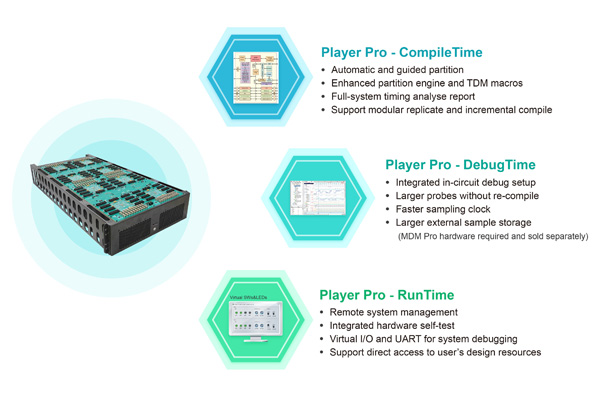
Prodigy Player Pro is a rapid prototyping software that works with the FPGA-based prototyping platforms from S2C. Prodigy Player Pro plays three roles in speeding your development process - it configures the prototype, runs remote system management and provides set up for multi FPGA debugging.
Diverse Automatic Partitioning Strategies: Tailored for multi-FPGA scenarios to optimize workload distribution.
Parallel Synthesis & Place and Route: Concurrent generation and Place and Route (P&R) to drastically cut down total compile time.
Incremental Compilation: Speeds up design iterations by compiling only the modified portions.
Structure & Signal Preservation: Concurrent netlist generation and Place & Route (P&R) to drastically reduce turnaround time.
RTL-Level Software Simulation: Supports full RTL simulation directly on the partitioned results to pinpoint issues early.
Clock Gating Conversion: Automatically converts clock gating cells into prototype-friendly structures.
Memory Mapping: Seamlessly maps and converts memory structures to fit the target architecture.
Multi-Driver Handling: Robust resolution and processing of multi-driver nets.
Black Box & Third-Party IP Support: Flexible integration of black boxes and external intellectual properties.
Stage-by-Stage Timing Reports: Provides detailed timing reports at every compilation stage, enabling real-time strategy optimization.
Faster auto partition engine supporting billion gate designs
Enhanced pin-multiplexing macro increases system performance up to 50%
Flexible pin-multiplexing ratios across multiple clock domains
Up to 70% time saving via optimized black-box flow
Fully automate and increase productivity with TCL scripting
An integrated GUI environment and TCL interface makes it easy to take an existing design, compile it, partition it into multi-FPGAs, and generate the individual bit files.
Prodigy Player Pro - Compile time has an intuitive GUI environment to guide all compile steps. After a design is compiled once, you can perform an ECO flow automatically in TCL mode:
Import design
Set up probes
Run synthesis
Partition design
Assign & I/Os
Run FPGA place and route
Generate bit file(s)
Prodigy Player Pro - Compile time provides a library of S2C daughter board pin-map files, and automatically matches them to I/O connectors. GUI-based clock and I/O properties assignment minimizes chance of error.
Prodigy Player Pro - DebugTime allows users to pre-select the signals to be observed before compilation and define the trigger conditions to start a data capture. During runtime, the selected signals are captured and stored in an external DDR4 memory for analysis.
Preserve internal FPGA probes
Probes are distributed to multiple FPGAs automatically based on the partition results
Set up trigger and trace signals in multiple FPGAs from a single console
Users can easily set the trigger events and combinational events through the Prodigy Player Pro Debug panel.
Trigger Events support: ==, !=, >=, <=,>, < and counting
Combinational Events support: !, &, |, ^, -> and counting
Supports up to 8 event trigger blocks
Supports trigger state machine language
Mark an unlimited number of internal FPGA probes
Trace up to 16K probes per FPGA in 8 groups of 2K probes each without FPGA re-compilation
MDM Pro hardware is required.
IP mode and Compile mode simplify the process and usage
Transmit trigger and trace data from multiple FPGAs to MDM Pro through high-speed transceivers
Write the sample data in VCD/FST format for analysis
Store large external 64GB of waveform
For compiled designs, Prodigy Player Pro - RunTime enables you to remote control and monitor the target portotyping platforms, through either Ethernet or USB connections.
Prodigy Player Pro can download the design to the FPGA(s) through USB or Ethernet. It can also write the design to an SD card on the Prodigy Logic Modules/Systems/Matrix and download the design from an SD card.
All system features can be controlled remotely through USB or Ethernet.
Automatic detection of daughter cards when plugged in
Easy monitoring I/O voltages, currents and temperatures
Support direct access to the internal registers and BRAM
Controlling multiple Prodigy Logic Modules/Systems conveniently from one console
A step-by-step wizard enables users to check for potential broken I/O pins, interconnection nets and clock lines. Users can also verify the global clock frequencies and I/O voltage settings.
Prodigy Player Pro provides virtual switches and indicators that you can use just like real hardware
Virtual LEDs for quick monitoring of design status
Virtual push buttons and switches to set design input conditions quickly
Virtual UART for convenient firmware debugging
A new release of Prodigy PlayerPro™ rapid prototyping software (PPro-7) signals S2C's resolute focus on advancing multi FPGA prototyping, including enhancements to its PPro-RT7 (RunTime), PPro-CT7 (CompileTime), and PPro-DT7 (DebugTime) prototyping software.
S2C's new Player Pro-7 rapid prototyping software release delivers high performance and faster time-to-implementation with RTL partitioning, enhanced timing analyzer, and SerDes-based TDM. The newly added RTL partitioning and module replication enable parallel design synthesis and accelerate the compile flow. Enhanced timing analysis offers more accurate performance estimates at the system level while SerDes-based TDM insertion adds higher bandwidth and more flexibility to the interlinking multiple FPGAs.
Cutting large SoC designs into blocks that will "fit" into each FPGA of a multi-FPGA prototyping platform.

 Prodigy Player Pro Datasheet